Halo teman-teman 👋, kali ini saya ingin berbagi project kecil membuat Clock Display dengan Java. Program ini menampilkan:
- Jam real-time (mengikuti jam sistem)
- Hari dan tanggal dalam bahasa Indonesia
- Suhu ruangan simulasi (20–35 °C) lengkap dengan ikon cuaca ☀ ❄ ☁
- Tampilan GUI sederhana menggunakan Swing
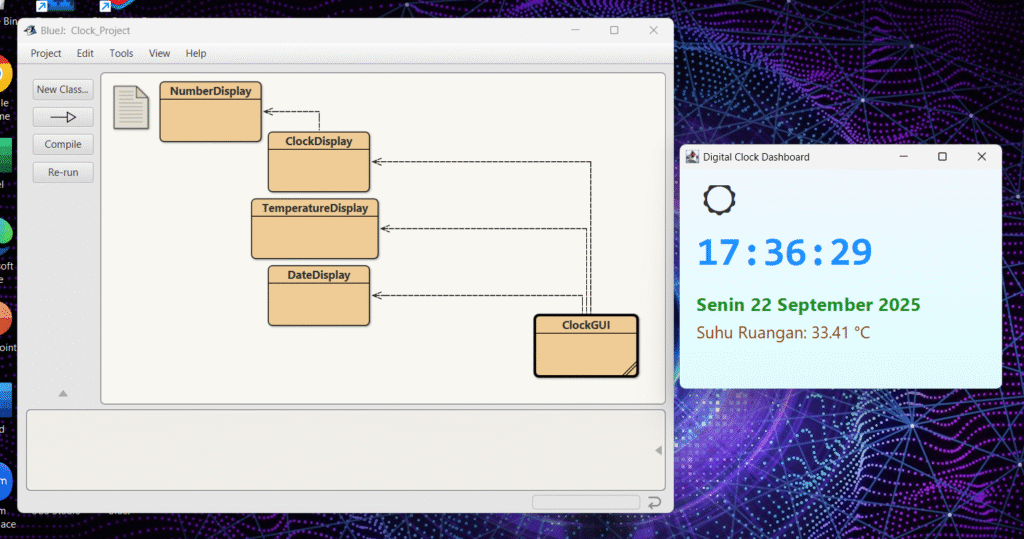
Hasil Tampilan
Berikut contoh hasil dari aplikasi jam digital ini:
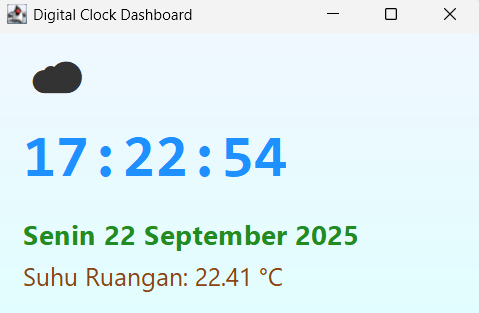
Pada layar terlihat ikon cuaca, jam besar di tengah, lalu hari, tanggal, dan suhu di bawahnya. Setiap detik, jam dan suhu otomatis diperbarui.
Struktur Program
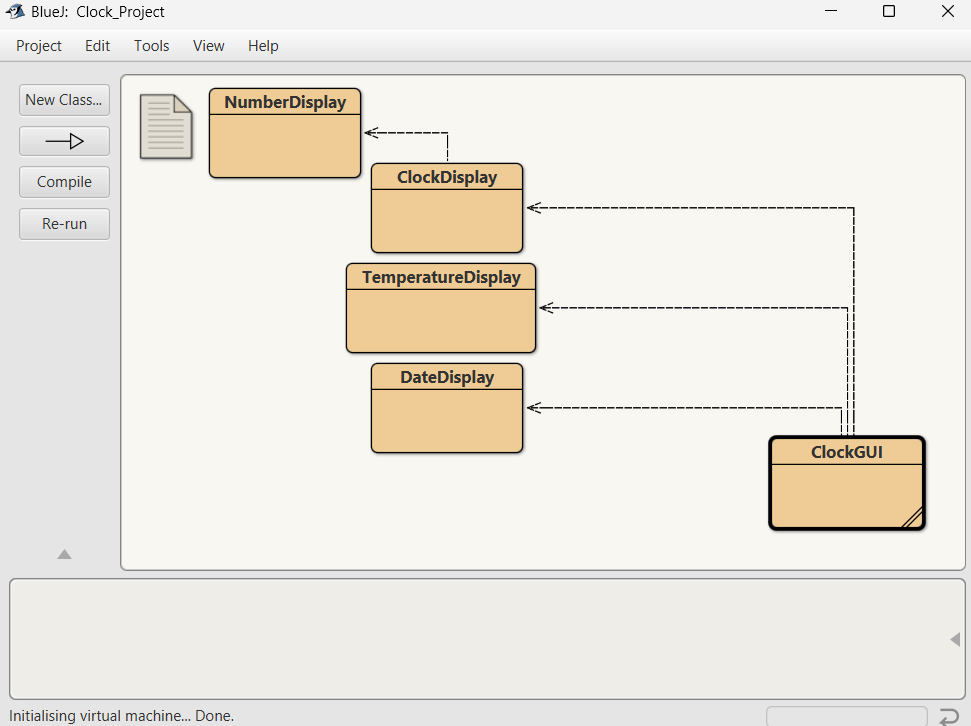
Program ini terdiri dari beberapa class agar lebih terorganisir:
- NumberDisplay → representasi angka untuk jam/menit/detik
- ClockDisplay → mengatur logika jam (sinkron dengan jam sistem)
- DateDisplay → menampilkan hari & tanggal format Indonesia
- TemperatureDisplay → simulasi suhu acak
- ClockGUI → menampilkan semua data ke layar dengan Swing
Kode
Berikut kode lengkap program (copy-paste ke BlueJ atau IDE Java favorit kalian):
A. Class NumberDisplay
public class NumberDisplay {
    private int limit;
    private int value;

    public NumberDisplay(int rollOverLimit) {
        limit = rollOverLimit;
        value = 0;
    }

    public int getValue() {
        return value;
    }

    public String getDisplayValue() {
        if (value < 10) {
            return "0" + value;
        } else {
            return "" + value;
        }
    }

    public void setValue(int replacementValue) {
        if ((replacementValue >= 0) && (replacementValue < limit)) {
            value = replacementValue;
        }
    }

    public void increment() {
        value = (value + 1) % limit;
    }
}
B. Class ClockDisplay
import java.time.LocalTime;

public class ClockDisplay {
    private NumberDisplay hours;
    private NumberDisplay minutes;
    private NumberDisplay seconds;

    public ClockDisplay(int hour, int minute, int second) {
        hours = new NumberDisplay(24);
        minutes = new NumberDisplay(60);
        seconds = new NumberDisplay(60);

        hours.setValue(hour);
        minutes.setValue(minute);
        seconds.setValue(second);
    }

    // constructor baru: otomatis pakai jam sistem
    public ClockDisplay() {
        LocalTime now = LocalTime.now();
        hours = new NumberDisplay(24);
        minutes = new NumberDisplay(60);
        seconds = new NumberDisplay(60);

        hours.setValue(now.getHour());
        minutes.setValue(now.getMinute());
        seconds.setValue(now.getSecond());
    }

    public void timeTick() {
        seconds.increment();
        if (seconds.getValue() == 0) {
            minutes.increment();
            if (minutes.getValue() == 0) {
                hours.increment();
            }
        }
    }

    public String getTime() {
        return String.format("%02d:%02d:%02d",
                hours.getValue(), minutes.getValue(), seconds.getValue());
    }
}
C. Class DateDisplay
import java.text.SimpleDateFormat;
import java.util.Date;
import java.util.Locale;

public class DateDisplay {
    private Date date;

    public DateDisplay() {
        updateDate();
    }

    public void updateDate() {
        date = new Date(); // ambil waktu sistem
    }

    public String getDayName() {
        // format hari (Senin, Selasa, Rabu, dst)
        SimpleDateFormat dayFormat = new SimpleDateFormat("EEEE", new Locale("id", "ID"));
        return dayFormat.format(date);
    }

    public String getDate() {
        // format tanggal (22 September 2025)
        SimpleDateFormat dateFormat = new SimpleDateFormat("d MMMM yyyy", new Locale("id", "ID"));
        return dateFormat.format(date);
    }
}
D. Class TemperatureDisplay
import java.util.Random;

public class TemperatureDisplay {
    private double temperature;
    private Random rand;

    public TemperatureDisplay() {
        rand = new Random();
        updateTemperature();
    }

    public void updateTemperature() {
        // simulasi suhu antara 20.00 – 35.00 derajat
        temperature = 20 + (15 * rand.nextDouble());
    }

    public String getTemperature() {
        // format 2 angka di belakang koma
        return String.format("Suhu Ruangan: %.2f °C", temperature);
    }

    public double getCurrentTemp() {
        return temperature;
    }
}
E. Class ClockGUI
import javax.swing.*;
import java.awt.*;

public class ClockGUI extends JFrame {
    private ClockDisplay clock;
    private DateDisplay date;
    private TemperatureDisplay temp;

    private JLabel iconLabel;
    private JLabel clockLabel;
    private JLabel dateLabel;
    private JLabel tempLabel;
    private Timer timer;

    public ClockGUI() {
        clock = new ClockDisplay();
        date = new DateDisplay();
        temp = new TemperatureDisplay();

        // --- Ikon cuaca ---
        iconLabel = new JLabel("☀", SwingConstants.CENTER);
        iconLabel.setFont(new Font("Segoe UI Emoji", Font.PLAIN, 40));

        // --- Jam (besar, tebal) ---
        clockLabel = new JLabel(clock.getTime(), SwingConstants.CENTER);
        clockLabel.setFont(new Font("Consolas", Font.BOLD, 48));
        clockLabel.setForeground(new Color(30, 144, 255)); // biru terang

        // --- Tanggal ---
        dateLabel = new JLabel(date.getDayName() + " " + date.getDate(), SwingConstants.CENTER);
        dateLabel.setFont(new Font("Segoe UI", Font.BOLD, 22));
        dateLabel.setForeground(new Color(34, 139, 34)); // hijau

        // --- Suhu ---
        tempLabel = new JLabel(temp.getTemperature(), SwingConstants.CENTER);
        tempLabel.setFont(new Font("Segoe UI", Font.PLAIN, 20));
        tempLabel.setForeground(new Color(139, 69, 19)); // cokelat

        // --- Timer update setiap detik ---
        timer = new Timer(1000, e -> {
            clock.timeTick();
            date.updateDate();
            temp.updateTemperature();

            clockLabel.setText(clock.getTime());
            dateLabel.setText(date.getDayName() + " " + date.getDate());
            tempLabel.setText(temp.getTemperature());

            // ganti ikon cuaca berdasarkan suhu
            double suhu = temp.getCurrentTemp();
            if (suhu < 20) {
                iconLabel.setText("❄");
            } else if (suhu < 28) {
                iconLabel.setText("☁");
            } else {
                iconLabel.setText("☀");
            }
        });

        // --- Panel utama dengan BoxLayout ---
        JPanel mainPanel = new JPanel() {
            // custom background gradasi
            @Override
            protected void paintComponent(Graphics g) {
                super.paintComponent(g);
                Graphics2D g2d = (Graphics2D) g;
                int w = getWidth();
                int h = getHeight();
                Color color1 = new Color(240, 248, 255); // AliceBlue
                Color color2 = new Color(224, 255, 255); // LightCyan
                GradientPaint gp = new GradientPaint(0, 0, color1, 0, h, color2);
                g2d.setPaint(gp);
                g2d.fillRect(0, 0, w, h);
            }
        };
        mainPanel.setLayout(new BoxLayout(mainPanel, BoxLayout.Y_AXIS));
        mainPanel.setBorder(BorderFactory.createEmptyBorder(20, 20, 20, 20));

        // tambahkan komponen
        mainPanel.add(iconLabel);
        mainPanel.add(Box.createVerticalStrut(15));
        mainPanel.add(clockLabel);
        mainPanel.add(Box.createVerticalStrut(10));
        mainPanel.add(dateLabel);
        mainPanel.add(Box.createVerticalStrut(5));
        mainPanel.add(tempLabel);

        // atur layout frame
        setLayout(new BorderLayout());
        add(mainPanel, BorderLayout.CENTER);

        setTitle("Digital Clock Dashboard");
        setSize(400, 300);
        setDefaultCloseOperation(JFrame.EXIT_ON_CLOSE);
        setLocationRelativeTo(null);
        setVisible(true);

        timer.start(); // langsung jalan
    }

    public static void main(String[] args) {
        SwingUtilities.invokeLater(ClockGUI::new);
    }
}
Penjelasan Singkat
- ClockDisplay mengambil jam sistem menggunakan
LocalTime.now(), jadi jam akan langsung sesuai dengan komputer kita. - DateDisplay memakai
SimpleDateFormatdengan locale Indonesia, sehingga format tanggal jadi sepertiSenin 22 September 2025. - TemperatureDisplay memberi simulasi suhu random antara 20–35 °C. Ikon cuaca berubah sesuai suhu.
- ClockGUI membuat tampilan dengan Swing, menampilkan jam besar di tengah, serta tanggal dan suhu di bawahnya.
Kesimpulan
Dengan project kecil ini, saya bisa belajar bagaimana menggabungkan OOP di Java dengan Swing GUI untuk membuat aplikasi interaktif sederhana.
Semoga bermanfaat 🚀